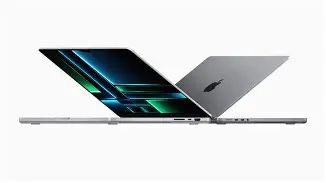
A Professional's Take on the New Macbook Pro 14 M2 2023
The Macbook Pro 14 M2 (2023) arrives as Apple's refresh for professionals who demand a compact, highly capable laptop that balances performance, battery life, and a mature macOS ecosystem. This review evaluates the machine from the perspective of real-world workflows — software development, creative production, photography, audio, and travel-focused business use — and explains what buyers typically care about when choosing a pro laptop. It covers design and build, display, performance under sustained loads, battery and thermals, ports and expandability, software compatibility, and long-term value.
Introduction: Who the 14-inch M2 Pro is for
The 14-inch Macbook Pro M2 (2023) is positioned for professionals who need more performance than ultraportables deliver, but who prefer the portability of a 14-inch chassis over a larger 16-inch workstation. Typical buyers include creative professionals who edit video and process large photo libraries, developers compiling complex codebases, music producers running multi-track sessions and virtual instruments, and business travelers who want a reliable machine with a long usable battery life.
Unlike consumer-grade laptops where the emphasis is often on thinness and price, professional buyers prioritize sustained performance, a color-accurate display, a good selection of ports for real-world workflows, and long-term software support. The 2023 refresh with Apple’s M2-series silicon strengthens the product's case in those areas; this review explains how those improvements translate into day-to-day productivity.
Design and build: familiar, refined, and pragmatic
Physically, the 14-inch M2 Pro retains the MacBook Pro language introduced in earlier generations: an aluminum unibody, a stable hinge, a full-sized keyboard with function row and Touch ID, and a screen with slim bezels interrupted by a small camera area in the top center of the panel. The chassis feels robust and businesslike. For travelers, the 14-inch form factor strikes a strong balance: it is portable enough to fit into briefcases and carry-on bags while still offering a usable keyboard and trackpad for long sessions.
Real-world takeaway: the laptop is built to be used every day. It is not the thinnest machine on the market, but it is clearly intended to prioritize thermals and sustained performance over minimal thickness.
Display and audio: one of the better laptop panels available
The Macbook Pro 14 M2 uses Apple’s high-end mini-LED panel with ProMotion adaptive refresh and HDR capabilities. For editors and photographers, that means deep contrast, strong highlights in HDR content, and an adaptive refresh rate that keeps UI interactions smooth without chewing battery when full speed isn’t needed.
Color accuracy out of the box is very good, and the panel supports high brightness for use in controlled, professional environments. The combination of excellent contrast and a wide P3 color gamut makes the screen suitable for color-critical work, though professionals who require certified color accuracy for print or broadcast should still calibrate with their instrumentation.
Audio is also strong for a laptop: the multi-driver speaker array provides better mid and low-frequency response than typical Ultrabooks, which benefits video playback and basic monitoring for music work without headphones.
Find top-rated Laptops & Computers products at great prices.
Shop Amazon →Performance and real-world workloads
At the heart of this model are the M2 Pro and M2 Max silicon options. Both deliver meaningful performance improvements over the previous generation for multi-threaded workloads and GPU-accelerated tasks. In practical terms:
- Software development: Large codebases and parallel builds complete faster. Developers who run local microservices, multiple containers, or virtual machines will appreciate the CPU throughput and increased unified memory ceilings, which reduce swapping and cache thrash during heavy multitasking.
- Video editing: For Final Cut Pro, Premiere Pro (Apple-silicon optimized builds), and DaVinci Resolve, real-time playback of multi-stream HD/4K timelines becomes smoother, and exports shorten substantially. The M2 Max configuration is particularly effective for GPU-accelerated effects and color grading on 8K or heavily layered projects.
- Photography: Lightroom catalogs and Photoshop operations that rely on memory and media throughput are noticeably snappier. Larger RAM options mean fewer compromises when working with multi-gigabyte RAW libraries.
- Music production: DAW sessions with dozens or hundreds of tracks, virtual instruments, and sample libraries demand both CPU and memory. The higher-memory configurations and efficient single-threaded performance reduce audio dropouts and allow more simultaneous instruments.
- Data and ML experiments: For many data analysts and researchers, the MacBook’s GPU compute is useful for prototyping and smaller ML experiments. For heavy model training or very large datasets, dedicated desktop GPUs or cloud resources remain the practical choice.
Important nuance: while peak synthetic benchmarks illustrate raw capability, professional users care most about sustained performance during long exports, continuous compiles, or long render sessions. The M2 series improves sustained throughput over prior chips in the same chassis, and the active cooling system helps maintain higher clocks under extended load. That said, thermal limits still exist in a 14-inch chassis; the 16-inch variant remains a better choice if absolute peak sustained performance in the quietest possible envelope is the top priority.
Thermals and battery life
Apple’s thermal management in the 14-inch Pro balances fan noise and thermals. Under light and moderate workloads the system is quiet; under heavy sustained loads it ramps fans as needed. For mobile professionals who perform occasional heavy tasks, the machine is an excellent compromise. For users running constant, multi-hour renders at maximum CPU/GPU, external cooling or a desktop alternative may offer higher long-term throughput.
Battery life in everyday use — email, web, coding, and media consumption — is typically a full workday for most users. Intensive tasks like rendering or GPU-accelerated exports reduce runtime significantly. The key real-world point is that the machine will commonly last through a travel day of mixed tasks, but one should not expect desktop-like endurance when pushing the CPU/GPU hard.
Ports, expandability, and storage
One of the 14-inch model’s strengths is its practical port selection: multiple Thunderbolt ports, an HDMI output, an SD card slot, and MagSafe charging. These are features professionals repeatedly ask for because they eliminate dongles for common workflows (camera cards, external displays, and fast NVMe docks).
Storage options are fast SSDs that handle heavy video and photo workflows. However, buyers should plan storage needs up front: internal storage and memory are not user-upgradeable after purchase. Many professionals will prefer to invest in the higher SSD tier at the time of purchase or use fast external NVMe enclosures for capacity expansion.
Software and ecosystem considerations
macOS continues to be a strong draw for many professionals thanks to the mature app ecosystem and developer tools. Major creative applications are optimized for Apple silicon, and native builds show strong efficiency gains. There are still occasional plugin or niche tool compatibility issues, so buyers should verify key third-party tools and plugins against Apple silicon compatibility lists or vendor guidance.
For developers, Xcode and many development toolchains are Apple-silicon native or well supported via Rosetta 2 when necessary. If workloads depend on Windows-native software, virtualization solutions and cloud services are viable, but they introduce workflow complexity relative to a native Windows workstation.
Shop the latest Laptops & Computers picks on Amazon.
View Offers →Repairability and upgradability
As with other modern Apple laptops, internal memory and storage are soldered, so choose the correct configuration at purchase. Repairability for components such as the battery, screen, and I/O is possible but not trivial; buyers should factor warranty and service options into their purchase decision, especially those who depend on minimal downtime.
Pros & Cons
- Pros:
- Very strong day-to-day and sustained performance for a 14-inch laptop.
- Excellent mini-LED display with HDR and ProMotion for creative work.
- Practical port selection (SD card slot, HDMI, Thunderbolt, MagSafe).
- Long-term software support and a mature macOS professional ecosystem.
- Good balance of portability and performance for frequent travelers.
- Cons:
- Memory and storage are not user-upgradeable — plan ahead.
- Not the quietest under sustained heavy loads; fans will ramp.
- Higher configurations can be expensive; cost-to-performance must be weighed.
- Although excellent for many ML tasks, very large-scale GPU compute is better handled by desktop GPUs or cloud infrastructure.
Quick comparison: how the 14 M2 fits into the Apple lineup
| Model | Best for | Performance Tier | Display | Ports | Memory Ceiling | Real-world trade-off |
|---|---|---|---|---|---|---|
| Macbook Pro 14 M2 (2023) | Creative pros who need portability, developers, travel-focused power users | High — M2 Pro/M2 Max options | Mini-LED, ProMotion, HDR-capable | Thunderbolt, HDMI, SD slot, MagSafe | High — configurable to meet pro needs | Strong balance of portability and sustained performance |
| Macbook Pro 14 (M1, earlier) | Pros valuing previous-gen value | Mid-high — slightly older silicon | Same class panel (mini-LED on Pro models) | Similar port set | Lower than newest Max options | Still capable; newer M2 improves performance and efficiency |
| Macbook Air M2 | Travelers and general users prioritizing thinness | Mid — efficient but less GPU/CPU throughput | High-quality LCD; no mini-LED HDR | Limited ports (primarily Thunderbolt) | Lower than Pro models | Excellent for light pro work, but not ideal for sustained heavy workloads |
Buying guide: choosing the right configuration for real needs
Choosing a configuration comes down to matching the machine to the workload and lifespan expectations. Below are practical guidelines based on common use cases.
Everyday professional (writers, managers, light design)
- CPU/GPU: Entry M2 Pro configuration is sufficient.
- Memory: 16 GB is generally adequate.
- Storage: 512 GB–1 TB depending on file sizes; use external storage for archives.
- Why: This combination balances cost and longevity without overspending on resources that won’t be used.
Developers and multitaskers
- CPU/GPU: M2 Pro recommended; M2 Max only if doing very large local builds or VM-heavy work.
- Memory: 32 GB if using many containers, VMs, or large IDE projects; 16 GB if lighter.
- Storage: 1 TB+ for local repositories, databases, and VMs.
- Why: More memory reduces paging; faster local builds improve iteration speed.
Content creators (video editors, colorists)
- CPU/GPU: Consider M2 Max for frequent 4K/8K editing and heavy GPU tasks.
- Memory: 32 GB minimum; 64 GB or above for large, layered 8K projects.
- Storage: 1–4 TB internal for active projects; use external fast NVMe for large libraries.
- Why: GPU and memory together drive real-world editing performance and timeline responsiveness.
Music producers and audio engineers
- CPU/GPU: M2 Pro is often sufficient; M2 Max helps with massive template sessions and many sample-based instruments.
- Memory: 32 GB or more if running very large sample libraries in memory.
- Storage: Fast internal SSD for project files; external SSDs for archives.
- Why: Low-latency audio depends on CPU and memory; larger memory reduces streaming overhead.
Long-term value and future-proofing
Professionals who plan to keep their machine for several years should prioritize memory over a slightly faster CPU tier. Unified memory cannot be changed later, and the impact of insufficient RAM is felt immediately in day-to-day workflow. Similarly, ample internal SSD capacity reduces dependence on external drives and keeps project management simpler.
Accessories and extras to consider
- Quality USB-C/Thunderbolt dock for multi-monitor setups and single-cable desk connections.
- Fast external NVMe enclosure for project archiving and high-throughput media playback.
- Colorimeter if doing color-critical photography or print work.
- Protective sleeve or case for frequent travel, and a spare power adapter if moving between workplaces often.
Practical final assessment
The Macbook Pro 14 M2 (2023) is a compelling option for professionals seeking a portable machine that does not compromise on pro-class features. It improves on prior generations in meaningful ways: faster silicon, higher memory ceilings, and a display well suited to creative tasks. Buyers who value portability and a versatile port selection will find the 14-inch M2 Pro an excellent everyday machine.
That said, decision factors include the scale of workloads and budget. For the heaviest sustained workloads and those who require quiet operation at maximum throughput for multi-hour renders, a larger chassis or desktop alternative may be more appropriate. For users whose work is less intense and who prioritize weight and price above all else, the MacBook Air M2 remains a strong contender.
Conclusion
From the professional standpoint, the Macbook Pro 14 M2 (2023) is a pragmatic and capable tool. It is designed for real-world use: a thoughtfully balanced machine that places performance where professionals need it most (sustained CPU/GPU throughput, a color-accurate display, and practical ports) while remaining compact enough for daily travel. Buyers should prioritize memory and storage at purchase to match their workflows and consider the M2 Max tier only if they regularly push large GPU- or memory-bound workloads. For many creatives, developers, and mobile professionals, the 14-inch M2 Pro hits the sweet spot between workstation power and portable convenience.