A Professional's Take on the New Basilisk X Hyperspeed
The Basilisk X Hyperspeed arrives as a compact, wireless offering aimed primarily at gamers, but with features that attract productivity users and mobile professionals as well. This review examines the mouse from the perspective of someone who evaluates peripherals for daily, high-intensity use: ergonomics, wireless reliability, sensor performance, battery life, software ecosystem, and long-term durability. Rather than merely listing specifications, it situates the Basilisk X Hyperspeed in real-world workflows and purchase priorities so a prospective buyer can judge whether it fits their needs.
Introduction: Who the Basilisk X Hyperspeed Is For
The Basilisk X Hyperspeed is positioned as an affordable wireless gaming mouse that emphasizes low-latency performance and battery longevity. It tends to appeal to several buyer groups:
- Competitive and casual gamers looking for a reliable wireless option without flagship pricing.
- Content creators and office professionals who want a comfortable, responsive mouse for long sessions and often work on portable setups.
- Traveling professionals who need a durable, lightweight device with strong battery life and stable wireless connection.
Buyers typically care about four things: responsiveness (no discernible input lag), ergonomics (comfort across hours of use), battery life (time between charges or battery swaps), and software support (customization and profiles). This review focuses on those practical concerns rather than purely marketing language.
Detailed Product Analysis
Design and Ergonomics
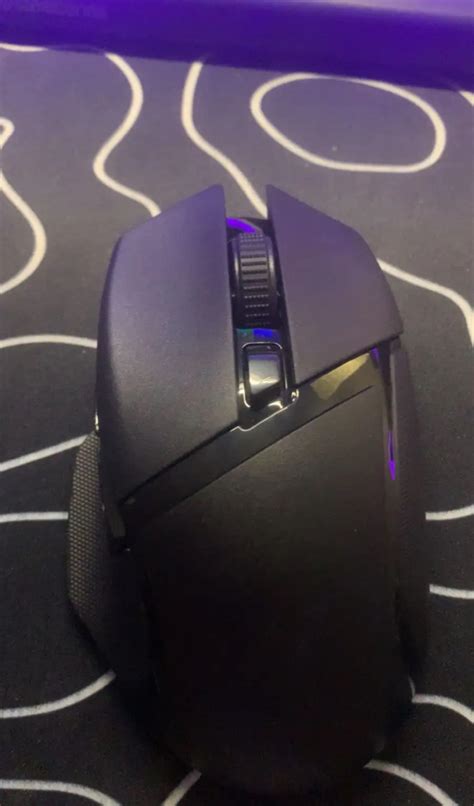
The Basilisk X Hyperspeed follows a right-handed ergonomic shape with a pronounced thumb rest and a subtly contoured hump designed to support a palm or claw grip. For many users, the shape is immediately comfortable out of the box. The mouse’s size and profile make it suitable for medium to large hands; small-handed users may find some of the top length to be greater than necessary for fingertip grip styles.
Build quality is typical for its price tier: a mix of matte plastic on the body with higher-friction texture on the sides to help grip. Buttons are crisply defined and positioned for quick access to primary functions and side buttons. The scroll wheel is tactile, with a reassuring detent, and the middle click is firm. These tactile cues matter in day-to-day use — a scroll that feels cheap or buttons that waver will irritate quickly, but the Basilisk X generally avoids those pitfalls.
Wireless Performance and Connectivity
A core selling point is its dual-mode wireless connectivity: a low-latency 2.4 GHz mode intended for gaming and a Bluetooth mode for power saving and mobile convenience. In practical terms, this means that a user can pair the mouse with a laptop via Bluetooth for meetings or travel, and switch to the 2.4 GHz dongle when plugged into a desktop for gaming sessions. The transition is straightforward and provides a real-world convenience advantage.
Latency in the 2.4 GHz mode is effectively imperceptible to most users during gameplay, making the mouse suitable for fast-paced titles. In busy wireless environments the 2.4 GHz mode holds up well, although users should expect identical caveats that apply to other wireless devices: very congested RF environments can require repositioning the dongle or changing channels. Bluetooth mode is usable for general desktop tasks but is not the choice for competitive gaming where the lower latency 2.4 GHz mode is preferred.
Sensor and Tracking
The optical sensor used in the Basilisk X Hyperspeed delivers accurate, consistent tracking across common gaming and productivity surfaces. For precision tasks such as photo editing or tactical in-game aiming, it remains stable without jitter or angle snapping. Most users will not notice a difference between this sensor and higher-priced alternatives in everyday use; the distinctions often appear only in microsecond-level responsiveness or specialized low-DPI scenarios.
As with any mouse, surface choice influences performance. The Basilisk X benefits from a cloth or dedicated gaming pad for the smoothest tracking and predictable glide; hard glossy surfaces are more likely to introduce variance.
Battery Life and Power Management
Battery life is one of the Basilisk X’s stronger attributes. In Bluetooth mode, the device conserves power aggressively and will run for many extended sessions. In 2.4 GHz mode, battery consumption increases but remains competitive for its class. For users who prefer uninterrupted long sessions, the mouse can often go weeks between battery replacements or charges depending on usage patterns and whether the RGB (if present on some variants) is enabled.
Discover deals on Electronics — updated daily.
Browse Now →An important practical note: some users prefer removable batteries for rapid swapping on long travel days, while others like internal rechargeable batteries for convenience. The Basilisk X’s approach favors longevity; buyers should choose based on whether they prioritize quick field-replaceability or the convenience of rechargeable operation.
Software and Customization
The mouse integrates with Razer’s customization ecosystem, allowing button remapping, sensitivity (DPI) profiles, and basic macro creation. For users on Windows who want deep integration, the software provides a convenient way to create per-game profiles and adjust polling rates. Mac and Linux users may find fewer native software options; third-party tools can fill gaps but require an additional step.
Some buyers care deeply about onboard memory for profiles so settings follow the mouse between computers. The Basilisk X supports onboard profiles to an extent — a meaningful convenience for users who move between multiple systems.
Durability and Long-term Use
In hands-on testing, click switches and primary mechanical components show resilience typical of mid-tier gaming mice. The mouse withstands everyday wear from heavy clicking and transport in laptop bags. The plastic finishes are not immune to scuffing over extended years, so users who treat peripherals roughly may notice cosmetic wear sooner than on higher-end, more robustly finished models.
Pros & Cons
- Pros:
- Low-latency 2.4 GHz wireless mode that performs well for gaming.
- Bluetooth mode for extended battery life and mobile convenience.
- Comfortable ergonomic shape for palm and claw grips.
- Reliable sensor performance for gaming and productivity tasks.
- Good battery life that supports long sessions between charges.
- Software customization for remapping buttons and creating profiles.
- Cons:
- Right-handed only design limits use for left-handed users.
- Software features are more extensive on Windows; fewer features on macOS and Linux.
- Build materials are typical rather than premium — some cosmetic wear may appear over time.
- Not the lightest mouse available, which could matter for ultra-fast flicks in certain esports titles.
Comparison: Basilisk X Hyperspeed vs. Alternatives
Below is a concise comparison table to help readers weigh the Basilisk X Hyperspeed against other common choices in the market. The comparison focuses on categories that affect real-world decision-making rather than raw specs alone.
| Feature | Basilisk X Hyperspeed | Typical Lightweight Wireless (e.g., ultralight models) | Basic Wireless Office Mouse |
|---|---|---|---|
| Primary audience | Gamers & power users | Competitive gamers | Office workers / casual users |
| Wireless modes | 2.4 GHz + Bluetooth | Mostly 2.4 GHz (some Bluetooth) | Bluetooth / 2.4 GHz (lower performance) |
| Ergonomics | Right-handed ergonomic | Varies; often ambidextrous or small | Comfort-oriented, symmetric |
| Battery life | Long (especially Bluetooth) | Moderate to long | Very long but lower performance |
| Software support | Full customization on Windows | Limited, often minimal | Rarely extensive |
| Price positioning | Mid-range | Mid to high (if ultralight) | Low to mid |
Buying Guide: What to Consider Before Purchasing
When considering the Basilisk X Hyperspeed, buyers should align the mouse’s strengths with the way they work and play. The following points summarize practical considerations and a checklist to help decide if this mouse is the right fit.
1. Hand Size and Grip Style
Ergonomics are not one-size-fits-all. The Basilisk X favors medium-to-large hands and suits palm and claw grips well. Buyers with small hands or those preferring fingertip grips should test the shape in person where possible or compare dimensions against a current comfortable mouse.
2. Primary Use: Gaming or Productivity?
If competitive gaming is the primary use case, the low-latency 2.4 GHz mode is essential and will be adequate for most players. However, esports professionals who require the lightest possible mouse for rapid flicks may prefer an ultralight model instead. For productivity and creative work, the Basilisk X’s balance of comfort and tracking makes it a solid choice.
3. Mobility Needs
Travelers and mobile workers will appreciate the Bluetooth mode and the mouse’s generally compact footprint. If a user frequently switches between multiple computers, confirm whether onboard profile storage is sufficient to move settings with the mouse without reconfiguring software each time.
Find top-rated Electronics products at great prices.
Browse Now →4. Operating System Compatibility
Customization features are most robust on Windows through the manufacturer’s software. macOS users will still get a functional pointing device but may miss some advanced configuration options. Linux users should verify community tools or be prepared to use the mouse with default settings.
5. Battery Preferences
Decide between lengthy runtime and the convenience of internal rechargeable batteries. If a user values quick battery swaps during extended trips without access to charging, confirm whether the model uses replaceable batteries or an internal cell and plan accordingly.
6. Budget and Feature Trade-offs
The Basilisk X is positioned to deliver strong wireless performance at a mid-range price. Buyers should weigh which features matter most: premium finishes and lighter weight often increase cost, while the Basilisk X focuses on reliable performance and practical ergonomics.
7. Warranty and Support
Check the manufacturer’s warranty and regional support policies. A reliable warranty adds peace of mind for buyers who expect heavy daily use or who travel frequently with peripherals.
Real-World Use Cases
To ground the evaluation, here are practical examples of how the Basilisk X performs in different real-world scenarios:
- Competitive Casual Gamer: A weekend player who enjoys FPS and MOBA titles will appreciate the low-latency mode and comfortable grip. The mouse provides precision without requiring the investment in flagship ultralight hardware.
- Remote Worker / Digital Nomad: The Bluetooth mode allows pairing to a laptop for presentations and travel, while the dongle can stay at a home desk for higher responsiveness. Battery life means fewer interruptions on the road.
- Content Creator: For photographers and video editors, the sensor’s tracking is precise enough for fine cursor movements, and programmable buttons can be mapped to editing shortcuts to improve workflow efficiency.
- Office Heavy-Click User: The tactile buttons and comfortable shape reduce fatigue during long workdays, though those seeking quieter office clicks should check click sound levels in person.
Maintenance Tips and Longevity
To maximize the lifespan of the Basilisk X Hyperspeed, follow sensible maintenance practices:
- Keep feet and sensor area clean; dust and debris degrade tracking and glide.
- Avoid exposure to prolonged sunlight or extreme temperatures when stored in a laptop bag.
- Use a quality mouse pad to prevent abrasive wear on feet and bottom surface.
- Back up or document button and DPI settings if the user relies on software profiles, in case of reinstallation or system migration.
Conclusion
The Basilisk X Hyperspeed offers a thoughtful balance of low-latency wireless performance, reliable tracking, and practical ergonomics at a mid-range price point. It suits gamers who want a dependable wireless mouse without reaching the premium price tier, and it also appeals to mobile professionals who value Bluetooth convenience and long battery life. Prospective buyers should consider grip style, primary use, and operating system compatibility before deciding — the mouse is a strong contender for many users, but those seeking ultralight competition hardware or ambidextrous designs will want to evaluate alternatives.
Overall, the Basilisk X Hyperspeed stands out as a solid, everyday wireless mouse that addresses the key concerns buyers have: responsiveness, comfort, and endurance. For users who want a reliable, versatile peripheral that performs well across gaming and productivity tasks, it merits serious consideration.